HOW TO USE BOOKWITS
CLIENT LISTS
BEGINNER
Client Lists Module Guide
Client Lists is your “work dashboard” for deadlines and recurring workflows. Create lists from criteria (year-ends, personal tax years, GST/HST, T-slips, payroll, WSIB, etc.), then track progress using statuses, notes, tasks, bulk actions, and exports.
How to Use Bookwits
9 min read

Why this module matters
It gives you a clear picture of what needs to be done—without spreadsheets—and helps
your team move work forward in a consistent workflow.
Where to find Client Lists
Go to: Clients → Client Lists
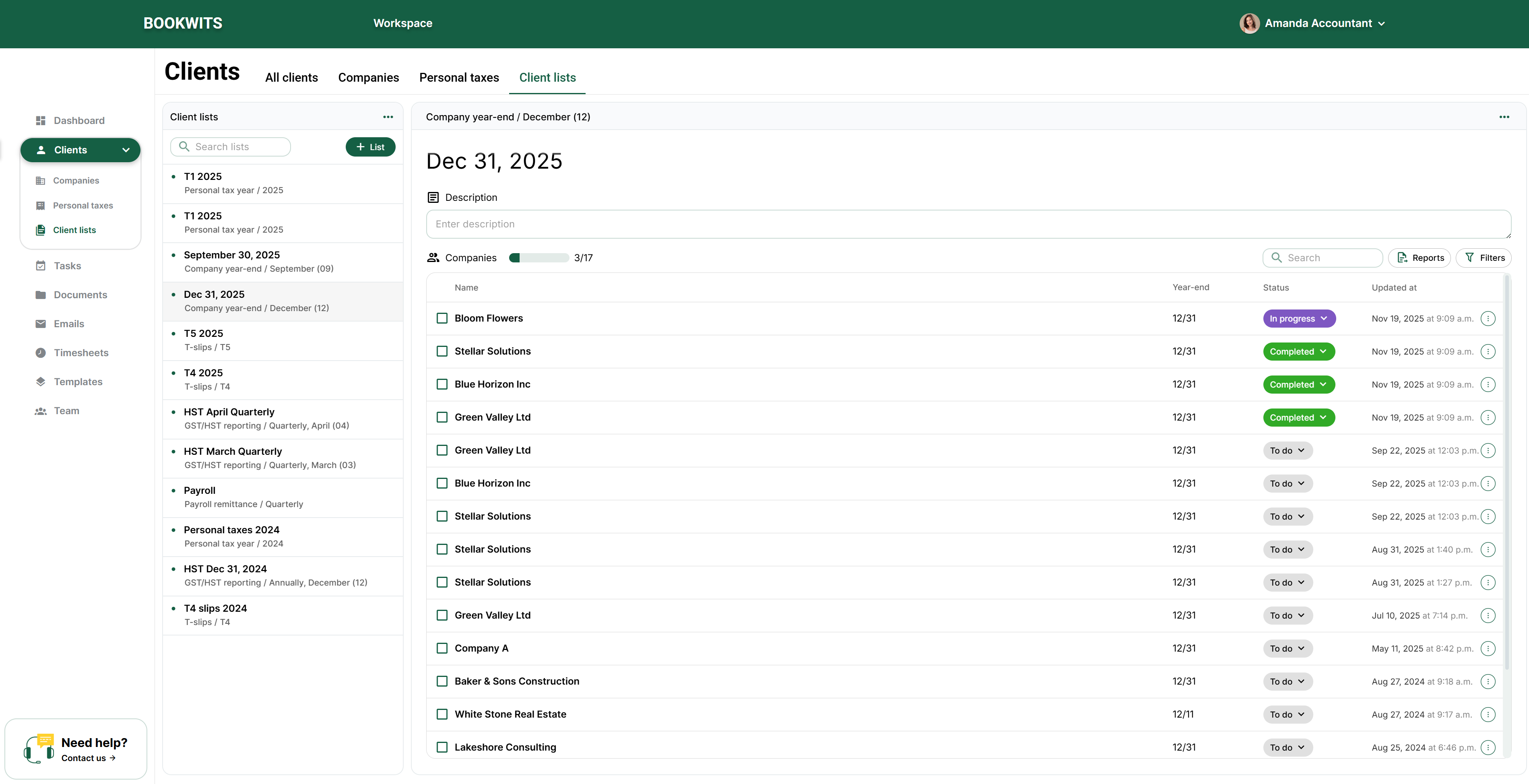
From here you can
- Create a new list based on criteria
- View existing lists
- Update statuses and notes
- Generate reports
- Create tasks for list items
What is a Client List?
A Client List is a generated list of items (clients, companies, or personal tax year
records) based on criteria you choose.
Examples
- “Company year-end – Dec 31, 2025”
- “Personal tax year – 2025”
- “GST/HST reporting – Quarterly filers”
- “T-slips – 2025”
Once created, the list becomes your operational tracker: you update statuses as
work progresses until everything is done.
Create a new Client List
Steps
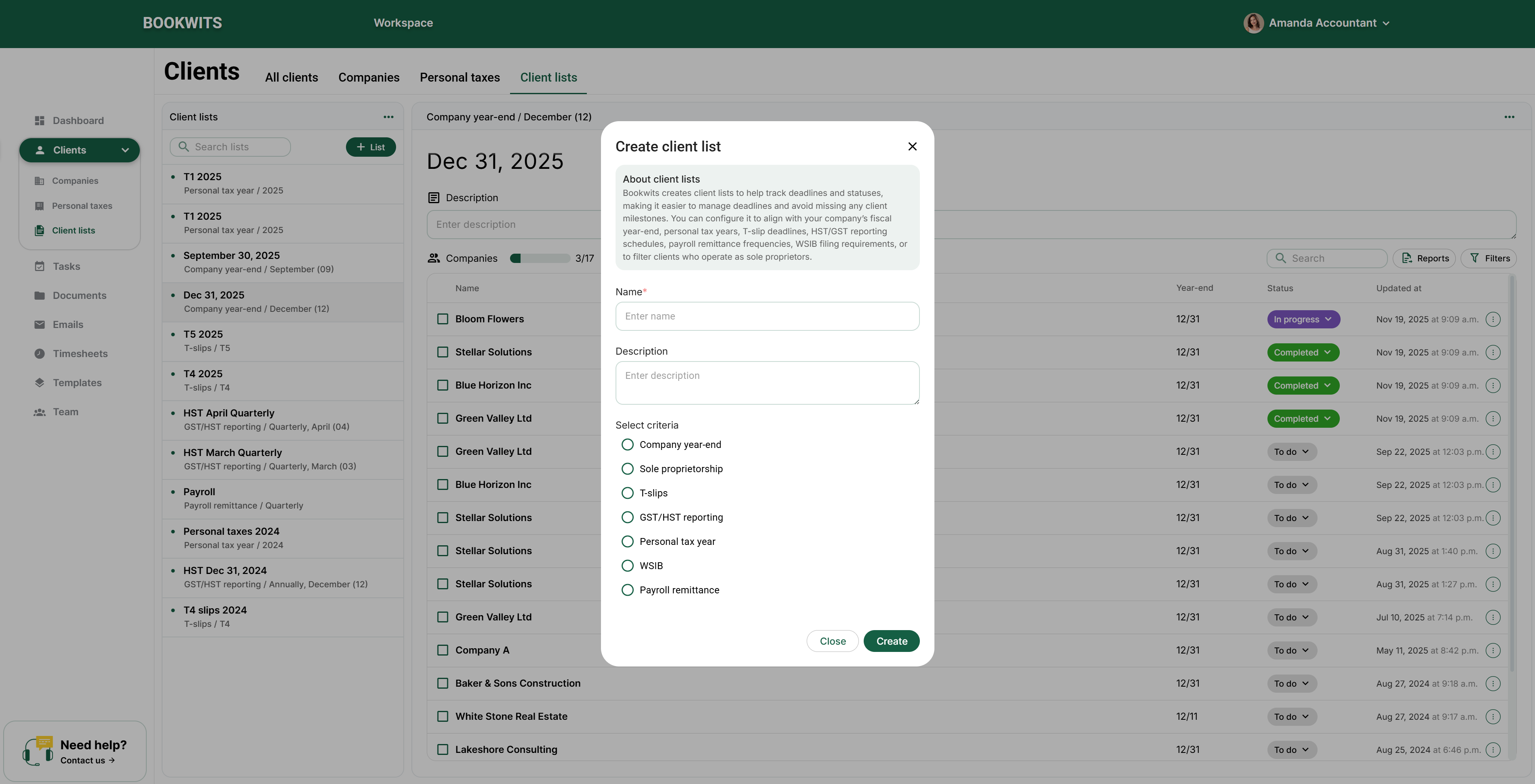
- Open Clients → Client Lists
- Click Create (or + List)
- Enter Name (required) and Description (optional)
- Under Select criteria, choose one
- Click Create
Common criteria options
Company year-end
Sole proprietorship
T-slips
GST/HST reporting
Personal tax year
WSIB
Payroll remittance
After choosing a criteria, Bookwits will ask for the key parameter(s) needed to
generate the list.
Example: Company year-end list (most common)
When you select Company year-end, you choose the year-end
month/date you want to pull (example: December (12) → Dec 31, 2025).
What happens after you create the list
- Bookwits pulls matching records from the Companies table
- It displays them as a list you can work through
- You’ll see a header like “Company year-end / December (12) / Dec 31, 2025” and a progress counter like “Companies 3/17”
Typical columns
- Name (company name)
- Year-end (e.g., 12/31)
- Status
- Updated at
Example rows: “Bloom Flowers — 12/31 — (status) — Nov 19, 2025”
Statuses (track progress per row)
Each row has a status so work is visible as it moves forward.
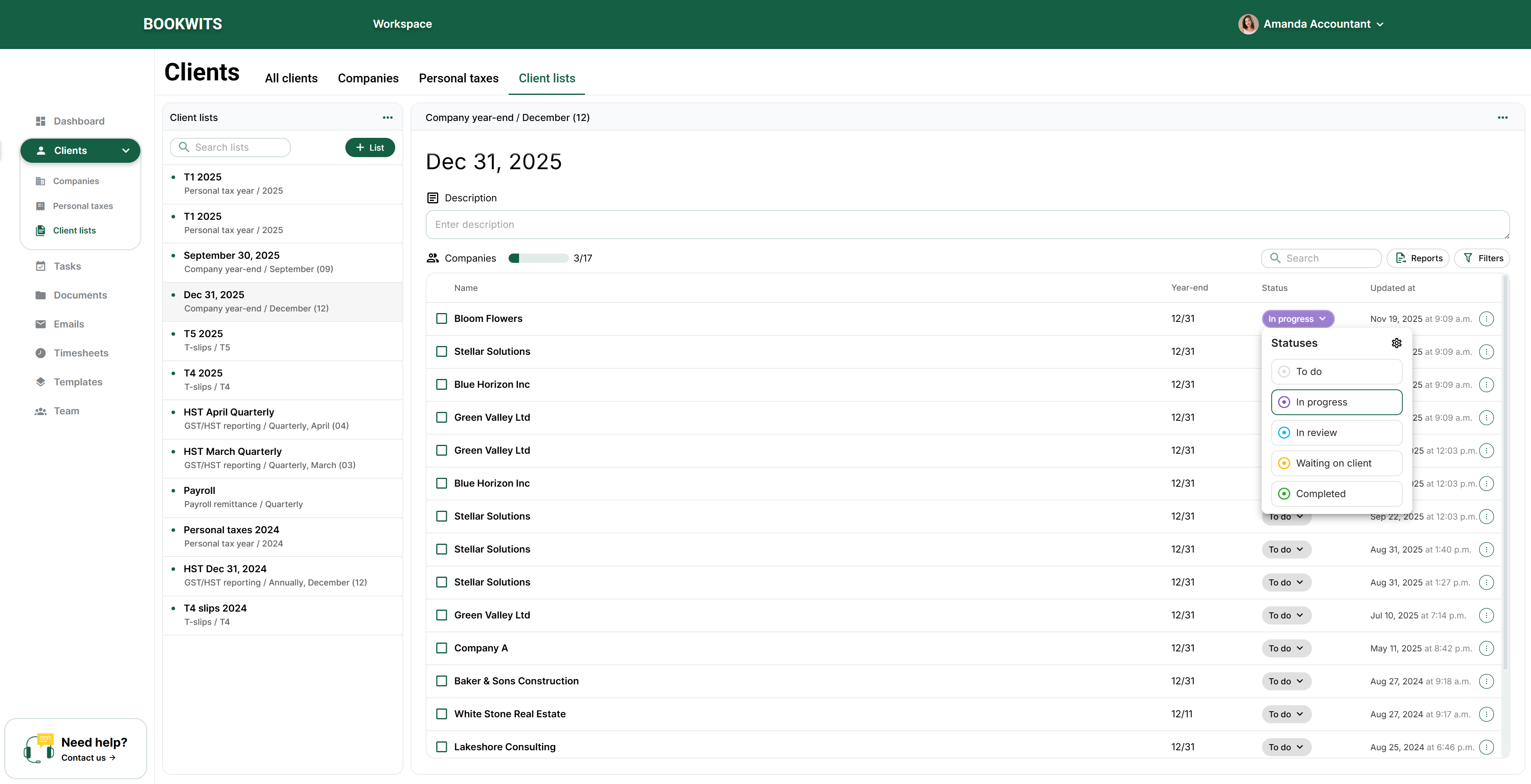
Default statuses
To do
In progress
In review
Waiting on client
Completed
Custom statuses (team workflow)
You can add custom statuses and control their order so lists match how your firm
actually works (e.g., Prep → Review → Filed → Delivered).
The goal isn’t fancy statuses—it’s consistency. A shared status language prevents
dropped files.
Notes (quick context per row)
Each row can include a note so your team can record blockers, requests, and “next
steps” context.
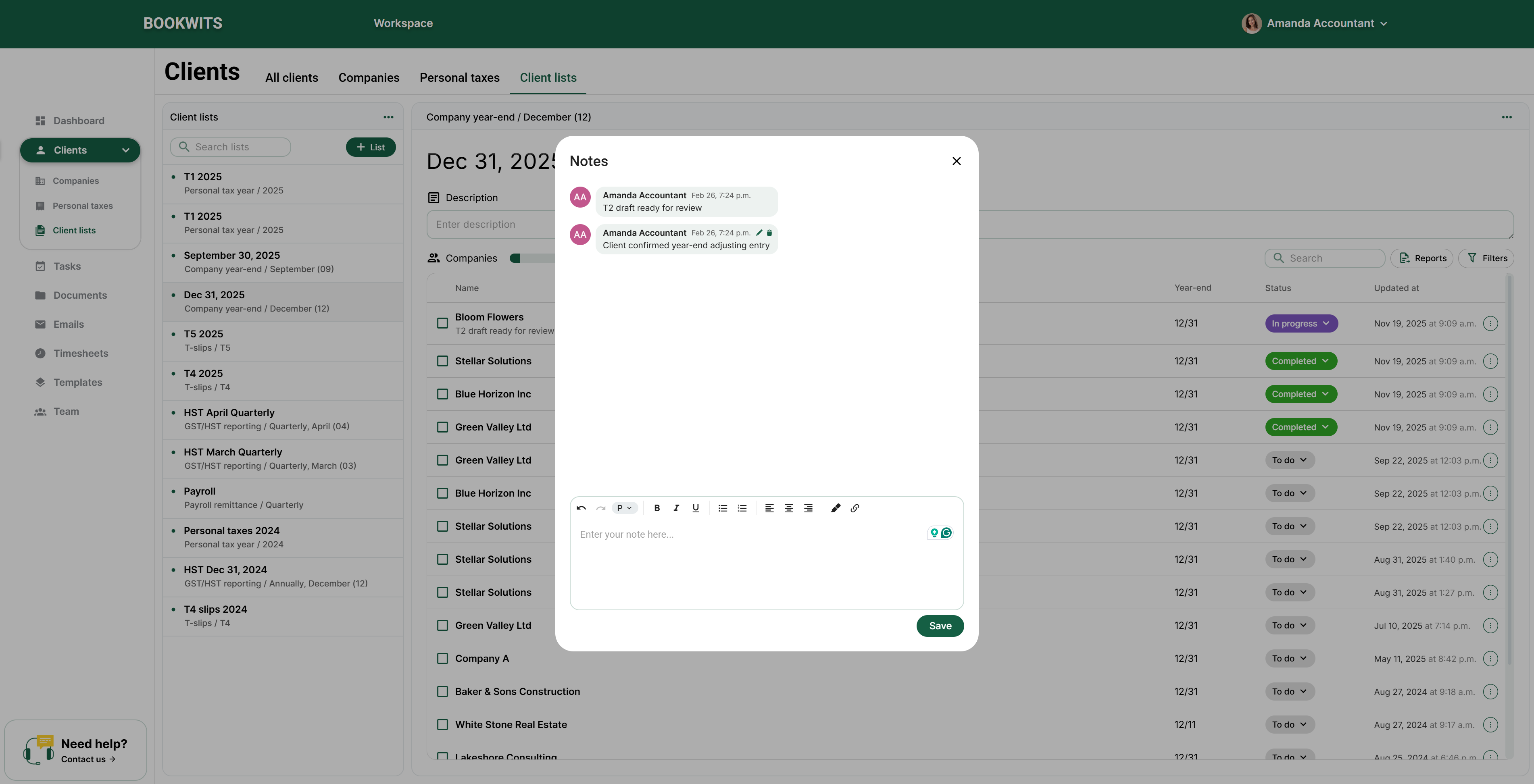
Examples
- “Waiting on bank statements”
- “T2 draft ready for review”
- “Client confirmed year-end adjusting entry”
Keep notes short and actionable—write them as if someone else will pick up the
file.
Create tasks from Client List items (turn tracking into execution)
Client Lists aren’t just tracking—you can create real tasks from rows so work gets
executed in Tasks.
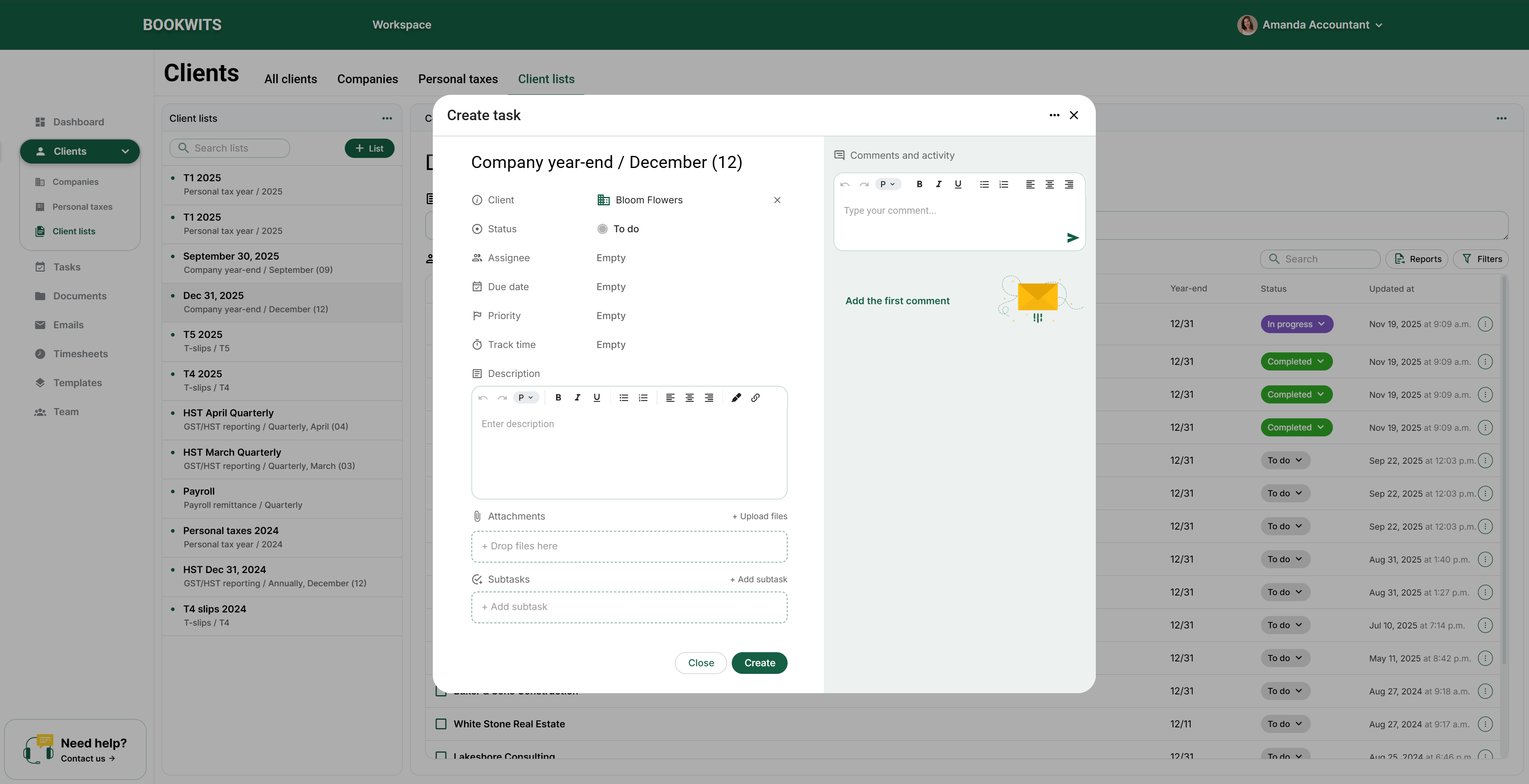
What you can set on the task
- Task title
- Assignee
- Due date
- Priority (if you use it)
- Subtasks (if needed)
- Attachments / comments (if needed)
The list stays as the high-level tracker; tasks are the day-to-day execution
layer.
Bulk actions (checkboxes)
Select multiple rows and apply bulk updates to move faster—especially during weekly
review meetings.
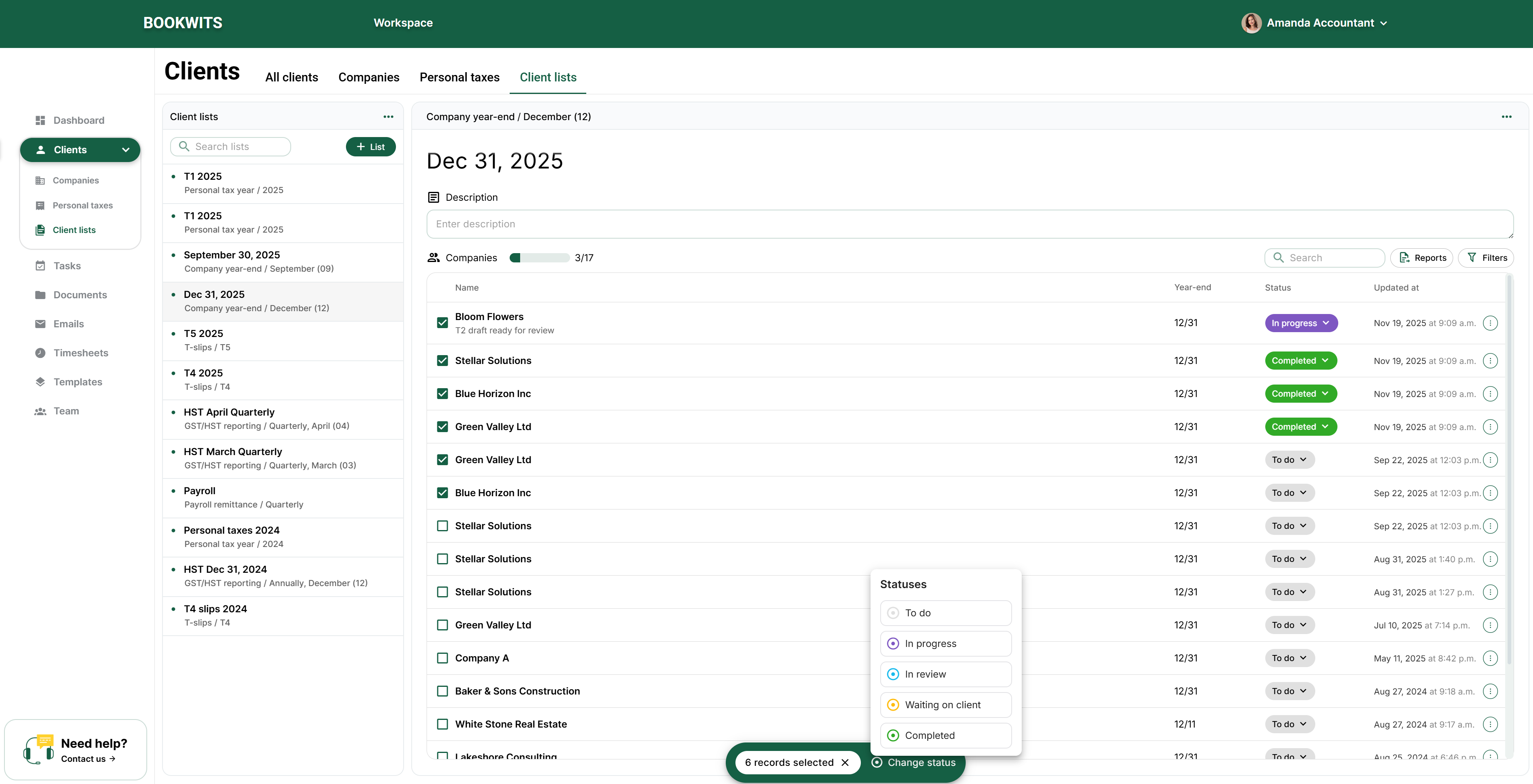
Common bulk actions
- Bulk change status (e.g., mark 10 items as “Waiting on client”)
- Batch update workflow state after a review meeting
Bulk updates are the secret weapon: 5 minutes of updating beats an hour of
spreadsheet cleanup.
Reports (CSV / XLS exports)
Generate exports to share progress internally, send summaries, or keep offline
backups if needed.
CSV
XLS
What gets exported
Exports are generated from the items currently in the list (based on the list’s
criteria).
Other Client List types (what they pull)
Comany year-end
Pulls companies based on year-end month/date criteria. Great for tracking year-end
workflows across clients.
Personal tax year
Specify the tax year (e.g., 2025) and Bookwits pulls all Personal Tax Year records
for that year. Great for tax season tracking.
GST/HST reporting
Pulls companies based on reporting schedule so you can track recurring compliance
cycles.
T-slips
Track slip preparation and collection deadlines across many clients.
Payroll remittance / WSIB
Recurring compliance workflows that benefit from a consistent “one view” tracker.
Sole proprietorship
Segment clients and build workflow lists around that category.
Why Client Lists save a lot of time
Client Lists replace spreadsheets and “mental tracking” with a structured workflow:
- Clear list of what needs to be done
- Consistent statuses across your team
- Easy bulk updates during weekly reviews
- Notes captured in one place
- Tasks created from list items for execution
- Exports when you need reporting
Bottom line: it creates a clear, shared picture of work-in-progress and keeps
deadlines visible.
Want a “starter set” of lists for your firm?
Book a demo and we’ll help you set up 5–8 lists that match your recurring workflows
(tax season, year-ends, GST/HST, payroll, T-slips) with clean statuses and a weekly
review rhythm.